
A visual history for your creative projects.
Immersion watches your project folders and saves a version each time a project file changes. Pick any earlier version from the graph to go back to it.
v1Reading the graph
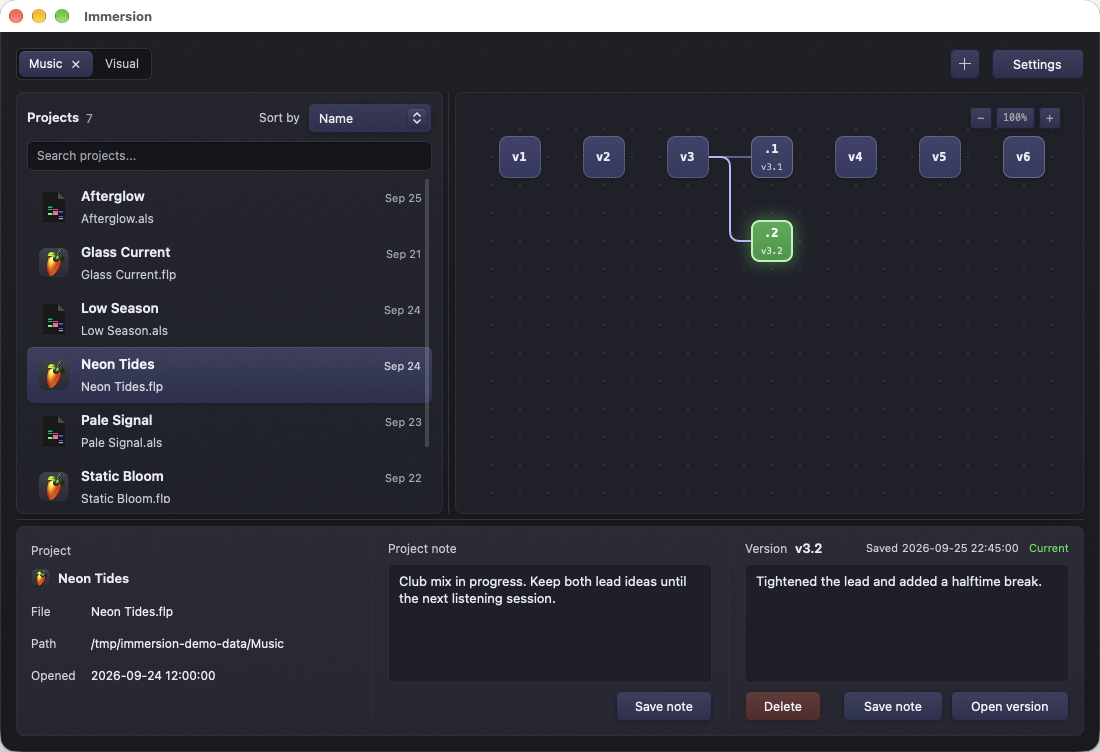
Tightened the lead and added a halftime break.
Click a version to see its note.
- Dashed border. The version's quick copy was removed to save space. It can still be restored from its compressed copy.
- Green. Current: the files saved in this version match what's on disk now.
- Branch. v3 was restored and the project saved again, so v3.1 and v3.2 start a new path. v4 to v6 stay where they were.
v2How it works
- Choose a folder of projects. Pick Bundles if each project has its own folder, or Files if each project is a single file.
- Immersion finds the project files it recognizes and saves a first version of each.
- While it runs, it saves a new version whenever a project file changes and settles.
- To go back, close the project in its app, select a version and choose Open version.
v3Details
- Storage
- Versions live in a
.musitfolder next to your project files. Identical content is stored once and older versions are compressed. There's no account and no cloud sync. - What it saves
- Project files and some related files. Large media, renders, samples and temporary files are usually skipped, so it is not a backup. Keep separate backups of your audio, video and other assets.
- Notes
- Each project and each version can have a note, so you can write down what changed.
- Background
- Runs from the menu bar on macOS and the tray on Linux, and can start at login. Double-click a project to open it in its usual app.
- Platforms
- macOS 12+ on Apple silicon, Windows x64 and ARM64. Linux builds are experimental and unsupported.
v4Supported apps
Music
Ableton Live, FL Studio, Logic Pro, Bitwig, REAPER, GarageBand, Cubase, Nuendo, Pro Tools, Studio One, Reason, Renoise, LMMS, SunVox, MuLab, Cakewalk, Ardour, Samplitude, Tracktion
Video and motion
DaVinci Resolve, Final Cut Pro, Premiere Pro, Media Composer, VEGAS Pro, HitFilm, After Effects, Nuke, Fusion
3D and visual art
Blender, Cinema 4D, Houdini, Maya, LightWave 3D, Photoshop, GIMP, Krita, Affinity Photo, Affinity Designer, Pixelmator Pro, Procreate, Aseprite, Clip Studio Paint, Capture One, Illustrator, Sketch, Inkscape, CorelDRAW
Publishing and games
InDesign, Scrivener, Affinity Publisher, LaTeX, Unreal Engine, Godot, Unity
The exact list of recognized files is in the manual. Try restoring a test version before relying on a project's history.
v5Download v0.2.8
Release notes · Linux build guide. Linux builds are unsupported: if you use one, you're responsible for fixing issues yourself.
v5Get it on your computer
There's nothing to install on this device. Send yourself the link and download Immersion on your Mac or PC.